
In modern web applications, image handling is rarely “just uploading a file.”
Poorly optimized images can slow down pages, waste bandwidth, and negatively impact user experience — something I wanted to avoid from the very beginning while building my personal portfolio and blog.
Rather than treating image uploads as simple storage, I designed a pipeline that optimizes images before they ever reach the cloud, ensuring performance, scalability, and maintainability.
This article walks through how I implemented an image upload system using Next.js Server Actions, Sharp, and Cloudinary, and why these architectural choices matter in real-world applications.
The Architecture at a Glance
The goal was simplicity on the frontend and intelligence on the backend.
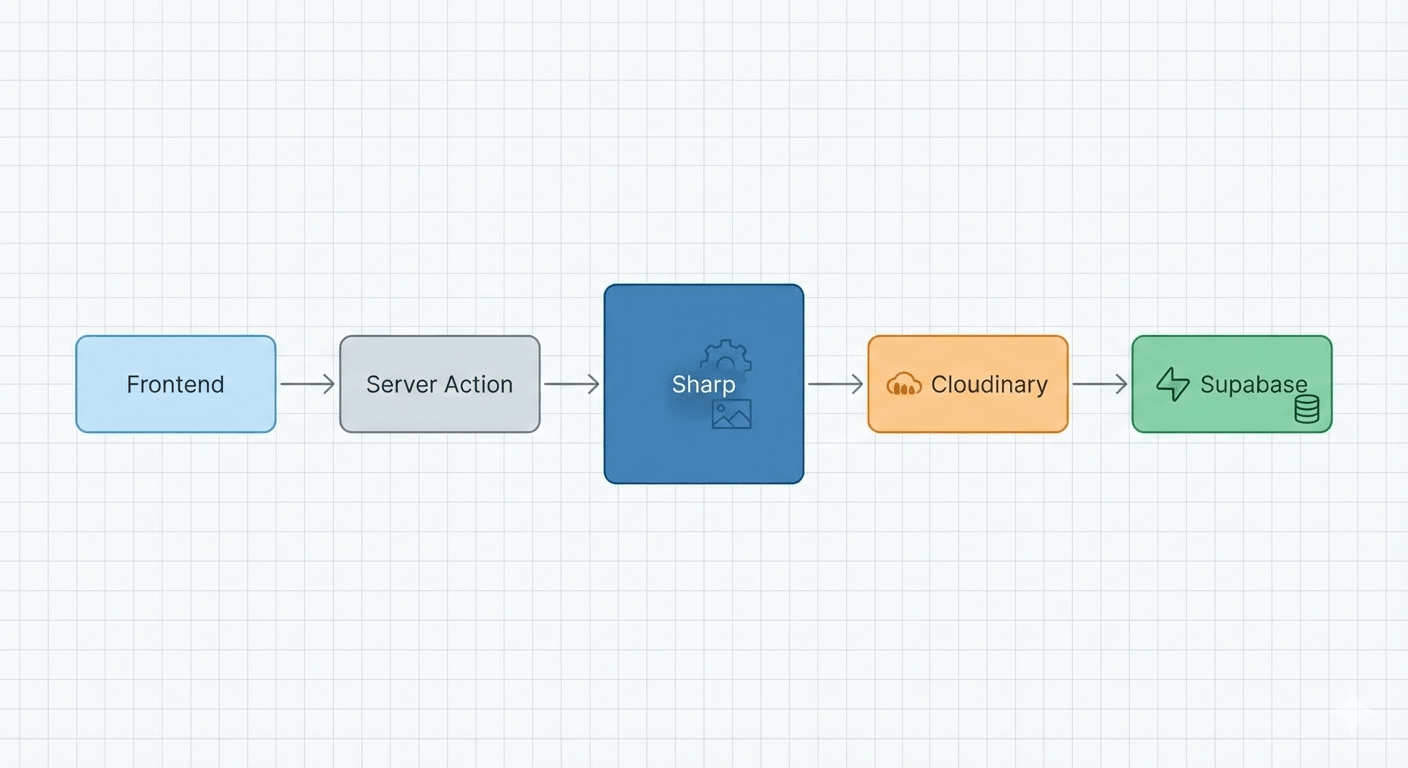
Flow overview:
Frontend – Standard file input or drag-and-drop interface
Server Action – Receives raw
FormDatasecurelyPreprocessing (Sharp) – Resizes, compresses, and strips metadata
Cloudinary – Stores and delivers assets via CDN
Supabase – Persists the optimized image URL
This approach allows users to upload large images while ensuring the application remains fast and bandwidth-efficient.
Step 1: Preprocessing Images with Sharp
Before uploading anything to Cloudinary, every image is processed in memory using sharp. This ensures consistent dimensions, optimized file size, and predictable performance across the site.
Below is the core utility function responsible for handling uploads:
import { v2 as cloudinary } from 'cloudinary'; import sharp from 'sharp'; import { Readable } from 'stream';cloudinary.config({ cloud_name: process.env.CLOUDINARY_CLOUD_NAME, api_key: process.env.CLOUDINARY_API_KEY, api_secret: process.env.CLOUDINARY_API_SECRET, secure: true, });
export async function uploadToCloudinary(file: File): Promise<string> { const buffer = Buffer.from(await file.arrayBuffer());
const processedBuffer = await sharp(buffer) .resize(3840, 2160, { fit: 'inside', withoutEnlargement: true, }) .jpeg({ quality: 95 }) .toBuffer();
return new Promise((resolve, reject) => { const uploadStream = cloudinary.uploader.upload_stream( { folder: 'portfolio_pro', use_filename: true, unique_filename: true, }, (error, result) => { if (error || !result) reject(error); else resolve(result.secure_url); } );
Readable.from(processedBuffer).pipe(uploadStream);
}); }
Why preprocess images?
This allows users to upload large raw images (even 20MB+), while ensuring that what gets stored and served is a web-optimized, high-quality asset.
It significantly reduces storage costs and improves page load speed.
Step 2: Integrating with Next.js Server Actions
Using the App Router, image uploads happen directly inside server actions — no separate API routes required.
When creating a blog post, the server action processes each content block. If a block contains an image, the upload is handled immediately and the resulting CDN URL is stored in Supabase.
async function processContentBlocks(formData: FormData) { const blocks = [];for (const block of extractedBlocks) { if (block.type === 'image' && block.file?.size > 0) { const imageUrl = await uploadToCloudinary(block.file); blocks.push({ type: 'image', value: imageUrl }); } }
return blocks; }
This keeps the content creation workflow seamless while maintaining strict control over asset optimization.
Final Outcome & Key Takeaways
This architecture offers several advantages:
Performance – Images are served via Cloudinary’s global CDN
Scalability – Storage remains efficient as content grows
Developer Experience – Upload logic is abstracted into a reusable utility
User Experience – Pages load fast without sacrificing image quality
By treating image uploads as a first-class performance concern, this system ensures the portfolio remains fast and reliable, even as it becomes more media-rich.